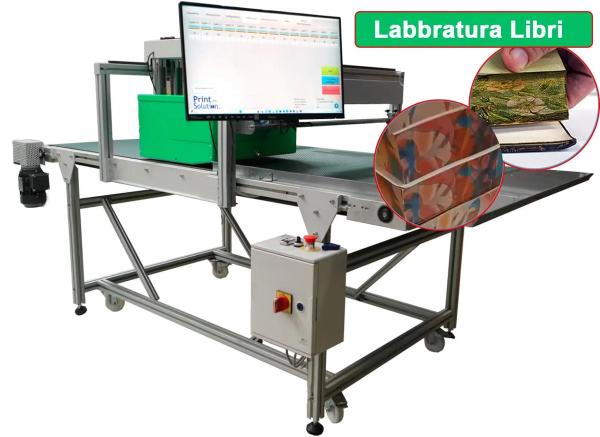
What book edge printing is, what changes between spraying and digital printing, and how GreenBox Print Book prints the edges of books, notebooks and diaries in full colour, even a single copy. Running in our demo room in Sesto San Giovanni.
Book edge printing is printing on the edges of a book, the three sides of the pages you see when the volume is closed. Until a few years ago it was done by spraying, in a single colour, or with gold leaf gilding. Today a single-pass inkjet printer prints colour images, gradients, text and even a different name on each copy directly onto the page block, even on a single copy.
This guide is for printers, binderies, publishers and stationery makers who get requests for editions with decorated edges and want to understand how it is done digitally and what is needed. At the end you will find the GreenBox Print Book, the book edge printer you can see running in our demo room.
What book edge printing is
The edge is the border of the page block after trimming: there is the top edge, the bottom edge and the fore edge, opposite the spine. Edge printing means decorating them. It is done on books, notebooks, diaries and notepads, for special editions, corporate gifts, stationery lines or simply to make a product recognisable on the shelf.
How it used to be done and what changes with digital
With traditional methods the block is clamped and the colour is sprayed on, or a metallic foil is applied. You get a flat colour or a gold effect, but no images, no gradients, no readable text. Every colour change takes cleaning and time, so it only pays off on identical batches.
Digital printing works like a printer on a sheet, except that the sheet is the edge of the book. The inkjet head stays still and the volume passes under it once: this is single-pass printing. The artwork comes from the computer, so:
- you print a full-colour image in four colours, with photos and gradients;
- you change the artwork on every copy without stopping the machine, useful for names, numbering or codes;
- you start from a single copy, with no plates and no minimum runs;
- you use water-based inks, with no solvents.
The machine: GreenBox Print Book
GreenBox Print Book is the version of the GreenBox platform dedicated to books. The operator places the volumes on the belt with the edge facing up and the 297 mm HP PageWide head prints them at 30 m/min, with pigmented water-based four-colour inks at 1200×1200 dpi. The head slides on a rail, with 80 cm of travel, and adjusts in height up to 30 cm, so it fits different formats and thicknesses. The GreenFlow software handles colour, variable data and QR codes, and the machine is Industry 4.0 ready.
| Feature | GreenBox Print Book |
|---|---|
| Print system | HP PageWide single-pass |
| Head | 297 mm, on a rail with 80 cm of travel |
| Inks | Pigmented water-based CMYK |
| Resolution | 1200×1200 dpi |
| Speed | Up to 30 m/min |
| Height adjustment | Up to 30 cm |
| Software | GreenFlow: colour, variable data, QR codes |
| Dimensions | 210×160×140 cm |
What to check before printing edges
The edge must be cleanly trimmed. The ink sits on the border of the pages: an uneven edge or staggered pages give an uneven print.
Paper matters. The result changes between uncoated and coated paper, and between different weights. Before taking on a job, run a test on the customer's paper.
The file must match the edge size. Height of the volume by thickness of the block: if the artwork has to continue across all three edges, it must be prepared for each side.
Try it with your books
The GreenBox Print Book is running in our demo room in Sesto San Giovanni, Milan. Bring your volumes: we print the edge in front of you with your artwork and you see the result on your paper. Call +39 02 4943 9417 or see the book edge printing page.
Sources
- GreenBox Print Book product sheet, Print Solution.
- Book edge printing solutions page, Print Solution.